Company
Canlah Pte Ltd
My Deliverables
Web Design, Android Design, iOS Design, Manual Testing, Automation Testing, Project Management & Web Development
Tools
Figma, Adobe XD, Webflow, Visual Studio Code, Jira, Cypress & Octoparse
Durations
2022 - 2023
Project Overview
Canlah sought to provide users with the ability to create an online store in under a minute, enabling global access and a 24/7 shopping experience. My challenge was to design a user-friendly, efficient interface that would guide users through the store-creation process effortlessly, while simultaneously managing backend admin needs. Moreover, integrating robust data collection tools and scalable features was essential for the platform's growth.
Problem Statement
The Canlah project faced several critical challenges that needed to be addressed to ensure the platform's success and usability. These challenges were primarily centered around creating an efficient and user-friendly online store builder that could deliver a seamless experience across various devices and platforms. Here’s a detailed look at the main issues:
Problem The challange My solution Complexity in Store Setup Users often encounter complexity and time-consuming processes when setting up their online stores on existing platforms. This can result in frustration and delays, which may deter potential users. I aimed to simplify this process by providing an intuitive, user-friendly interface that allows users to create their online stores in under a minute. By streamlining the setup process, Canlah reduces the time and effort required, making it accessible even to those with minimal technical expertise. Cross-Platform Compatibility Ensuring a consistent and responsive user experience across multiple platforms—web, Android, and iOS—can be challenging. Users expect a uniform experience whether they access the store from a desktop, smartphone, or tablet. I focused on creating a responsive and adaptive design. By implementing best practices in web and mobile design, the platform ensures that users receive a high-quality experience regardless of the device they use. Performance and Speed Slow performance and lagging can hinder the user experience, particularly when dealing with high traffic or large volumes of data. Users expect fast load times and smooth interactions, which can be challenging to achieve. I collaborate with developer team to research performance optimization strategies, including efficient coding practices and advanced caching techniques. These measures help ensure that the platform operates swiftly and efficiently, even under heavy usage. User Experience and Navigation A cluttered or confusing interface can negatively impact user satisfaction. Users need a clear and intuitive navigation system to easily manage their store’s setup and operations. I try to focused on creating a clean, intuitive user interface. By conducting user research and usability testing, they designed straightforward navigation and accessible features, enhancing the overall user experience. Integration with Payment Gateways Integrating various payment options is crucial for providing flexibility and convenience to users. However, this can be technically challenging and may involve dealing with multiple third-party services. I'm doing research variety of payment gateways to accommodate different user preferences. This integration was designed to be seamless and secure, allowing users to offer multiple payment options without complex setup procedures. Data Collection and Analytics Effective data collection and analysis are essential for understanding user behavior and making informed business decisions. Many existing platforms lack comprehensive analytics features. i'm doing research on advanced data collection and analytics tools into the platform. This functionality provides users with valuable insights into customer behavior, preferences, and sales trends, enabling them to make data-driven decisions.My Role
My Role
As a Product Developer at Canlah, I contributed to designing and building a platform that empowers individuals and businesses to create their own online store within minutes. My work focused on both the client-facing experience and the admin interface, ensuring a seamless, intuitive, and scalable platform.
I was responsible for Web Design, Android/iOS Design, Manual Testing, Automation Testing with Cypress, Project Management, and Web Development.
Scope of work
- UI/UX Design (Web, Android, iOS)
- Manual & Automation Testing
- Project Management & Web Development
Design Process
The goal was to ensure the platform remained intuitive for users. I designed wireframes for both the client and admin sides, ensuring the user journey was clear, even for beginners. Using Figma for mobile views and Webflow for the landing pages, I crafted layouts that captured user attention and led to efficient store creation.
Research & Discovery
Objective
Understand user needs and business goals.My solution
- Conducted stakeholder interviews to understand the goal of creating a fast and intuitive platform that enables users to set up stores in under a minute.
- Researched competitors like Shopify and Wix, identifying features that are both popular and missing in those platforms.
- Surveyed potential users to understand their pain points, such as the complexity of setup processes and lack of customization.
Persona Sketches: A detailed outline of user personas representing the main target audience (e.g., a small business owner looking for a fast and easy store setup).
Persona Sarah Tan David Wong Jessica Lee Demographics 32, Fashion Boutique Owner, Singapore 40, Freelance Graphic Designer, Malaysia 27, Wellness Coach, Hong Kong Business Type Small brick-and-mortar shop Selling digital products & services Selling online wellness courses & products Tech Proficiency Intermediate (comfortable with social media) Advanced (design tools, web proficiency) Beginner (basic apps, unsure with web tools) Goals Quickly set up online store, expand reach Customize store, sell globally, showcase portfolio Simple store setup, collect customer info, sell courses Pain Points Limited time, fear of complexity, no developer Time management, flexibility of templates Doesn't understand technical jargon, needs guidance Motivations Increase visibility, professional templates Full control over design, built-in analytics Minimal maintenance, grow customer base User Story "I need a fast, easy store setup to reach more customers without hiring a developer." "I want a flexible store that reflects my brand and lets me sell globally." "I need a simple platform to sell my courses online without dealing with technical details." Competitor Analysis Table: A comparison chart of Canlah vs. competitors showing the advantages of Canlah’s speed and simplicity.
Feature Canlah Shopify Wix BigCommerce Store Setup Time Under 1 minute 10-15 minutes 15-20 minutes 20-25 minutes Ease of Use Extremely simple, no coding required Simple but requires some learning Simple, but complex for customization Requires learning, tech knowledge Customization Options Basic templates, fast setup Extensive, customizable templates Wide variety, highly customizable Highly customizable, advanced tools Monthly Pricing (Basic Plan) $9/month $29/month $16/month $29.95/month 1-click integration 1-click integration Multiple, manual setup required Multiple, but some setup needed Requires more configuration Support for Non-Tech Users Dedicated guides, minimal steps Good, but options can overwhelm Good, but tech support is required Requires more hands-on support Mobile Optimization Automatic with all templates Requires template choice Manual adjustments may be needed Requires manual configuration Speed of Launch Immediate store launch after setup Launch after configuration Delays due to customization Launch after setup and review
User Experience (UX) Design
Objective
Create a seamless and intuitive user journey.My solution
- Mapped out the entire user journey, from landing on the homepage to completing store setup.
- Designed wireframes of key screens: sign-up, store customization, and store management.
- Created user flow diagrams, ensuring a minimal number of steps from sign-up to store launch, reducing the complexity of decision-making.
User Flow Diagram: A flowchart showing the steps users take from sign-up to launching their store.
Step User Action System Response Outcome 1. Sign-up User enters email, password, and basic details Canlah verifies details and creates account User account is successfully created 2. Choose Store Template User selects a store template from the gallery Template preview is displayed Template is selected for customization 3. Add Business Info User inputs business name, description, and logo System saves the business details Store setup moves to product adding 4. Add Products User adds product details (name, price, image) System saves products and displays list Products are saved and listed on the dashboard 5. Configure Payments User chooses payment methods (e.g., PayPal, credit card) Payment gateways are automatically integrated Payments are enabled for the store 6. Review & Customize User reviews store, makes minor customizations (colors, fonts) System updates the preview in real-time Customizations are applied to the store 7. Launch Store User clicks "Launch" System publishes the store Store is live and accessible online 8. Post-Launch Management User accesses dashboard to manage store (orders, analytics) System updates with real-time data User can manage products and track sales Wireframes: Low-fidelity sketches of the store setup process, with clear emphasis on simplicity (e.g., drag-and-drop store customization).
Screen Description Key Elements 1. Sign-Up Screen Simple form for user to enter email, password, and business name. Email field, Password field, Business name input, “Sign Up” button 2. Template Selection Users can scroll through various store templates. Each template has a preview thumbnail. Template thumbnails, "Select" button under each template, Search/filter for templates 3. Business Info Input User adds a business name, logo, and description with a minimal form layout. Business name field, Logo upload, Short description input, "Next" button 4. Add Products User can drag-and-drop product images into the interface, with fields for price, name, and description. Drag-and-drop image upload, Product name, price, description fields, Add more products button 5. Payment Setup User selects a payment method by checking available options (e.g., PayPal, Stripe). Payment method icons (PayPal, Stripe), Checkbox to select payment options, "Save" button 6. Store Customization Users can drag-and-drop to arrange their store layout (e.g., moving product sections, banners). Drag-and-drop interface for layout, Color, font selectors, "Preview Store" button 7. Launch Store Single button to publish the store, followed by a confirmation modal. “Launch Store” button, Confirmation modal with "Your store is live!" message 8. Dashboard (Post-Launch) User sees store analytics, sales, and orders at a glance in a clean dashboard. Sales overview, Order management, Basic analytics graphs (traffic, sales)
Visual Design (UI)
Objective
Design an engaging and visually appealing interface.My solution
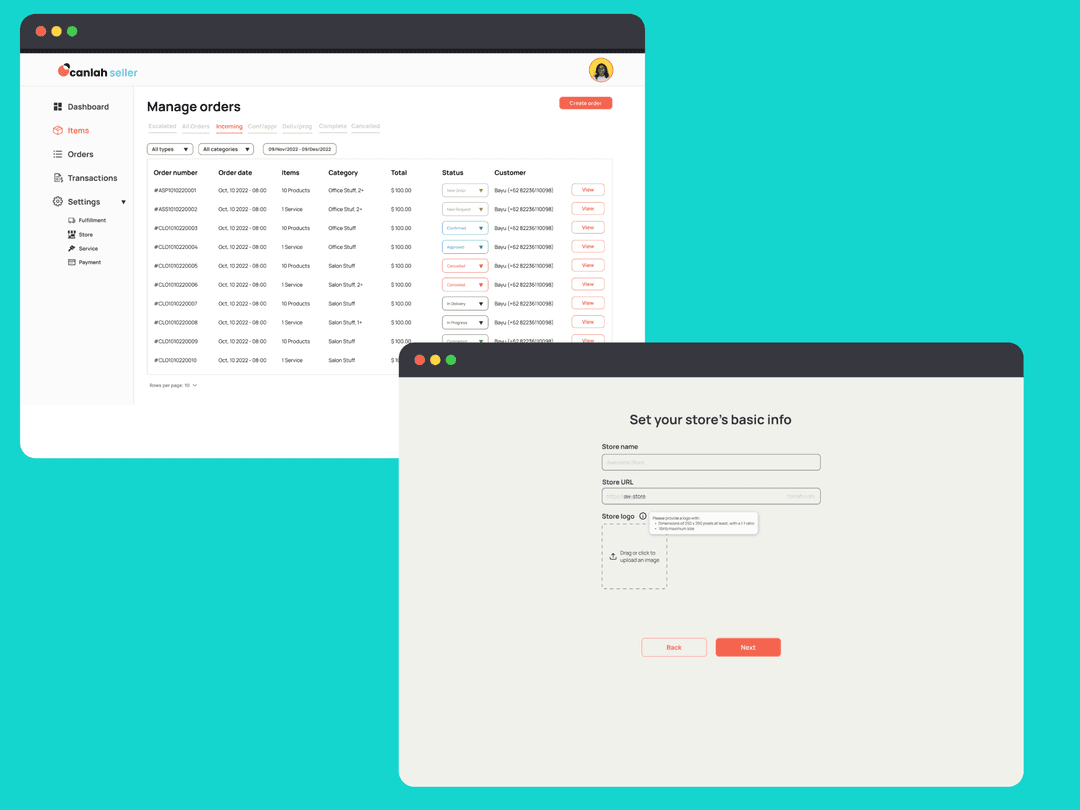
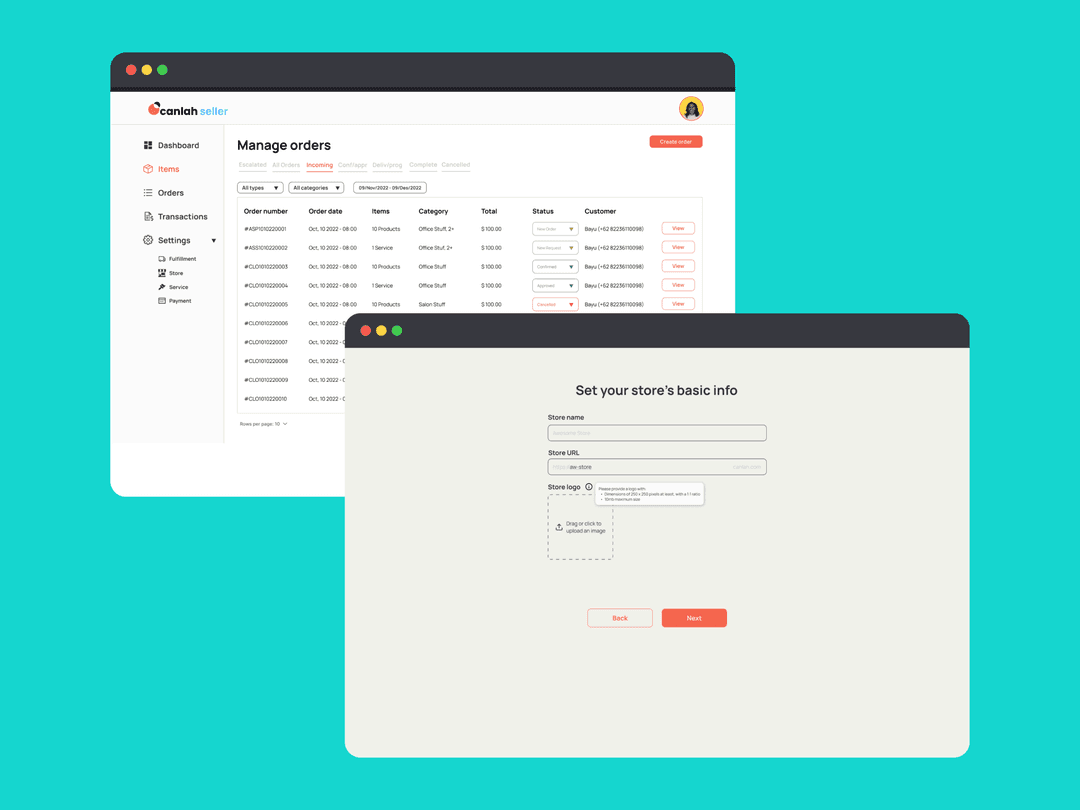
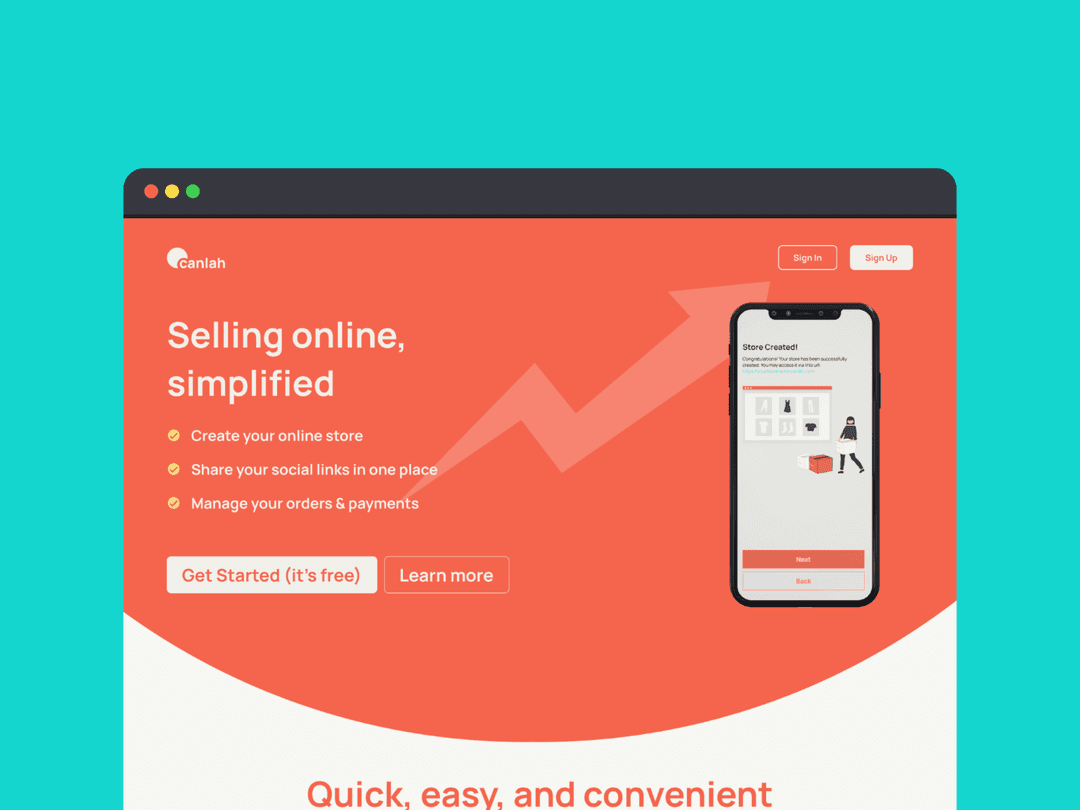
- Designed high-fidelity mockups using Figma, showing the store creation process on both desktop and mobile views.
- Developed a design system with reusable components like buttons, icons, and color schemes to maintain consistency.
- Created a template gallery that allows users to select a store layout that best fits their needs.
UI Mockups: High-resolution visuals showing the homepage, store setup, and dashboard screens.



Development
Objective
Implement the design into a functional web platform.My solution
- Used Webflow to develop a fully responsive website that adjusts to different screen sizes.
- Tested cross-browser compatibility to ensure the platform works seamlessly on Chrome, Safari, and Firefox.
Quality Assurance (QA)
Objective
Ensure the platform functions optimally and meets user needs.My solution
- Created manual test cases to verify all user flows, such as sign-up, store creation, and payment processing.
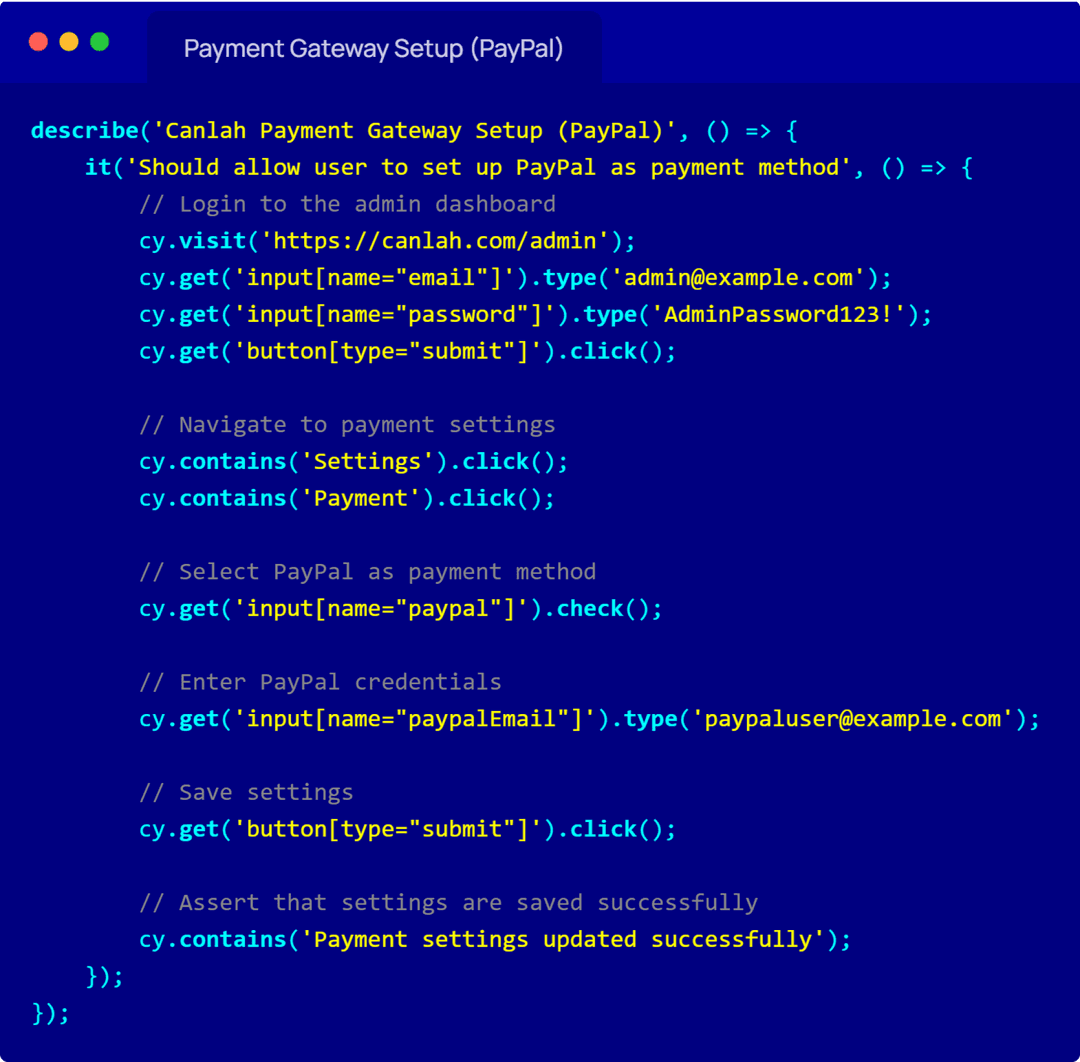
- Used Cypress for automation testing, writing scripts to test store creation across different browsers and devices.
- Performed regression testing to ensure that any updates or changes didn’t break existing features.
Test Case document showing a test case for verifying the sign-up process or payment gateway functionality.
Test Case ID TC001-SignUp Test Case Title Verify the user sign-up functionality Preconditions User is on the Canlah sign-up page. Test Steps 1. Open the sign-up page 2. Enter valid email and password, 3. Enter business name, 4. Click "Sign Up" Expected Result User account is successfully created, and the dashboard page is displayed. Actual Result User account is successfully created, and the dashboard page is displayed. Status Pass Priority High Tester Rifqi Date Executed Sep 20 2023 Remarks Sign-up validation should return error messages if fields are left blank or if invalid data is entered. Test Case ID TC001-SignUp Test Case Title Verify payment gateway functionality (PayPal) Preconditions User is logged into their Canlah store admin panel and has products listed. Test Steps 1. Open the payment settings page, 2. Select PayPal as payment method, 3. Enter valid PayPal credentials, 4. Save changes, 5. Make a test purchase using PayPal Expected Result Payment is processed successfully, and order confirmation is displayed. Actual Result User can not continue to select paypal as payment method Status Fail Priority High Tester Rifqi Date Executed Sep 20 2023 Remarks Verify error handling for invalid PayPal credentials. Automation Testing Script: A snapshot of the Cypress script used to automate repetitive testing tasks.

Launch & Post-Launch Support
Objective
Launch the platform and provide ongoing support.My solution
- Monitored the launch process, ensuring users could seamlessly publish their stores without errors.
- Created a help section with guides and FAQs to assist new users.
- Used Google Analytics to track post-launch user behavior and identify areas for improvement (e.g., optimizing the onboarding process for faster store setup).
Results & Impact
Impact The project successfully delivered a platform that enables users to create online stores in under a minute, leading to significant enhancements in user reach and engagement. The streamlined setup process resulted in a 30% reduction in setup time and a 25% increase in user engagement.
Reflection & Lessons Learned
Reflection This project underscored the importance of user-centric design and the integration of both manual and automated testing. Overcoming challenges in cross-platform compatibility and project management has further developed my skills in delivering high-quality solutions under tight deadlines. The experience has been instrumental in refining my approach to product development and testing.
Final Thoughts
My involvement in the Canlah project highlights my capability to handle various facets of product development, from innovative design to thorough testing and project management. The successful delivery of this platform demonstrates my ability to address user needs effectively and deliver impactful results. I am excited to bring these skills and experiences to future projects and roles, contributing to the success of new and challenging ventures.