Company
PT. Romas Jaya
My Deliverables
Web Design, Mobile design, Manual Testing, Automation Testing and Project Management
Tools
Figma, Adobe XD, Webflow, Visual Studio Code, Trello
Durations
2024 - 2024
Project Overview
Bottle Garden, a prominent liquor retail chain with a dozen stores, sought to enhance its customer and staff experience through a state-of-the-art Point of Sale (POS) system. My role was to lead the design and development of this system, focusing on both the admin and client sides to provide seamless user interaction and operational efficiency.
Summary
- Overview of Bottle Garden’s business.
- The project's objective: designing and implementing the POS system.
- Brief mention of key features (inventory management, sales tracking, customer interface).
Problem Statement
Bottle Garden faced challenges in streamlining in-store operations, managing inventory across multiple locations, and enhancing the overall customer shopping experience. The existing system lacked the agility to support their expanding retail network and customer demands. The goal was to design a user-friendly POS system that could integrate with their existing operations and improve both customer and staff efficiency.
The challenges faced by the business.
Section Details Overview of Bottle Garden’s Business Bottle Garden is a flourishing liquor retail chain with a network of 12 offline stores, Provides convenient access to quality liquor, strategically located in city centers and suburbs, Offers a diverse selection of spirits, wines, and beers for both casual drinkers and connoisseurs. Project’s Objective Design and implement a seamless Point of Sale (POS) system, Enhance customer shopping experience, Streamline store operations and inventory management across multiple locations. Key Features of the POS System Inventory Management: Efficient tracking of stock levels, automatic restocking alerts, and inventory control across all store locations, Sales Tracking: Real-time sales data and analytics to help store managers monitor performance and make data-driven decisions, Customer Interface: User-friendly interface for smooth product discovery, checkout, and payment options (cash, card, etc.). Why the project was necessary & The desired outcomes
Section Details Challenges Faced by the Business Difficulty in managing inventory across multiple store locations, Existing system lacked real-time sales tracking and data-driven decision-making, Customer shopping experience was not fully optimized, leading to longer transaction times and inefficient checkout processes Why the Project Was Necessary Needed a unified POS system to streamline in-store operations and improve efficiency, Required better inventory control and real-time data analytics to support the growing network of stores, Enhance the customer experience with a modern, easy-to-use interface for both staff and customers. Desired Outcomes Develop a seamless POS system that integrates inventory management, sales tracking, and customer interface, Improve transaction speed and inventory accuracy, Provide a user-friendly and efficient experience for both store managers and customers.
My Role
As the Product Owner, I was responsible for overseeing the design and development process. I collaborated closely with stakeholders to define system requirements, set priorities, and manage the product roadmap. My focus was to ensure that the solution aligned with Bottle Garden’s business objectives while providing an exceptional user experience.
I led the design of the POS system, including creating wireframes and high-fidelity mockups for both the admin and client sides. Additionally, I developed testing protocols, implemented automation tests, and managed the project timeline through an agile framework.
| Section | Details |
|---|---|
| My Responsibilities | Led the design and development of the POS system (Web and Android), Managed manual and automation testing to ensure system stability, Oversaw project management, maintaining the roadmap and timelines using Agile methodology, Delivered user-friendly interfaces for both the admin and client sides, ensuring the POS system aligned with business objectives. |
| Collaboration with Team Members and Stakeholders | Worked closely with Bottle Garden’s stakeholders (store managers, business owners) to gather requirements and prioritize features, Collaborated with the design team to create high-fidelity wireframes and mockups for the POS system, Coordinated with the development team to ensure smooth integration of the POS system with existing infrastructure, Regularly communicated updates and changes to the stakeholders for feedback and approval. |
| Key Decisions | Prioritized the integration of inventory management and sales tracking as core features based on business needs, Decided to use Cypress for automation testing to ensure continuous testing throughout the development lifecycle, Chose a user-centered design approach, iterating based on user feedback from store managers and customers to refine the POS interface, Implemented a Kanban-based Agile approach to manage project sprints, improving communication and meeting deadlines efficiently. |
Scope of work
- UI/UX Design
- Manual & Automation Testing
- Project Management & Web Development
Design Process
I followed a user-centered design process, starting with research on competitor POS systems and user interviews with store managers and customers. This led to creating mockups, user journey maps, and wireframes. Design iterations were made based on feedback from stakeholders and usability testing, ensuring the system was both intuitive and functional.
Research & Discovery
personas for Bottle Garden POS, with a focus on comparing different types of potential users from the liquor store and Food and Beverage (FnB) industries
Attribute Bayu Wahyu Sarah Lingga Age 35 32 45 38 Job tittle Manager, Liquor Store Chain Owner, Independent Cafe Bar Owner, Downtown Location IT Manager, Multi-Location Restaurant Chain Industry Liquor Retail Food and Beverage (Cafe) Food and Beverage (Bar) Food and Beverage (Restaurant) Business Size Medium-sized chain with 5-10 locations Single location Two high-traffic locations Large chain with 10+ locations Technology Proficiency Intermediate High Intermediate Advanced Key Pain Points Managing inventory across multiple locations, tracking sales trends, ensuring compliance with regulations. Limited resources for managing inventory and orders, time-consuming checkout process. Managing large volumes of sales during peak hours, keeping inventory stocked, preventing revenue loss. Integrating the POS with existing restaurant management systems, tracking analytics across locations. Goals Improve inventory control, streamline sales reporting, increase operational efficiency. Reduce manual processes, improve speed of transactions, track popular products. Speed up checkout process during peak hours, reduce stockouts, increase sales per transaction. Ensure seamless integration with other tools, enhance reporting and analytics capabilities, improve system security. Motivations Need for real-time inventory updates, fast transaction processing, and a user-friendly interface. Simplifying daily operations, gaining insights into top-selling items, and offering quicker service. Maximizing profitability during peak hours, reducing transaction times, and improving customer satisfaction. Keeping the system running smoothly across all locations, gaining deeper insights into sales data, ensuring data security Preferred Features Multi-location inventory management, compliance tracking, sales trend analytics. Simple interface for fast transactions, real-time order and inventory updates, easy reporting. Fast checkout, integration with mobile payment methods, low stock alerts, multi-location support. Integration with existing restaurant systems, robust reporting and analytics, advanced security features. Challenges Balancing feature needs with budget, ensuring minimal system downtime. Finding a cost-effective solution that doesn’t sacrifice ease of use or reliability. Ensuring system handles high volume without downtime, choosing a scalable solution as business grows. Balancing feature depth with system complexity, ensuring data security and compliance across all locations. Buying Criteria Comprehensive inventory management, compliance reporting, pricing within budget, reliable customer support. Cost-effective, intuitive interface, ability to track sales and inventory in real-time, mobile support. High transaction speed, multi-location support, scalability, integration with payment systems. Integration capabilities, scalability, advanced security, real-time analytics, centralized control. how Bottle Garden POS is positioned compared to other POS systems based on the provided metrics.
Metric Bottle Garden POS Pawoon Moka POS Competitor 3 Market Share 8% 15% 25% 10% Number of Active Users 5,000+ 10,000+ 20,000+ 8,000+ Number of Transactions 300,000/month 500,000/month 1,200,000/month 400,000/month Average Transaction Time 4.5 minutes 4 minutes 3 minutes 5 minutes Inventory Management Features Advanced with real-time updates, multi-location support Basic stock tracking Advanced with real-time updates Intermediate stock tracking Customer Support 24/7 support via chat, email, and phone 24/7 support via chat and email 24/7 support with phone and email Business hours support via email only Integration Capabilities Integrates with accounting software, CRM, and e-commerce Integrates with popular accounting software Integrates with multiple third-party apps Limited integration options Pricing $35/month $30/month $40/month $25/month User Satisfaction (Rating) 4.3/5 4.2/5 4.5/5 4.0/5 Customizability High Low High Medium Cloud-Based Yes Yes Yes no Mobile App Availability Android Android Android Android Data Security Advanced encryption and compliance with regulations Standard encryption and data protection Advanced encryption and compliance with regulations Basic encryption
Mockups and User Journey Maps
Created high-fidelity mockups for both the admin and client interfaces of the POS system using Figma.
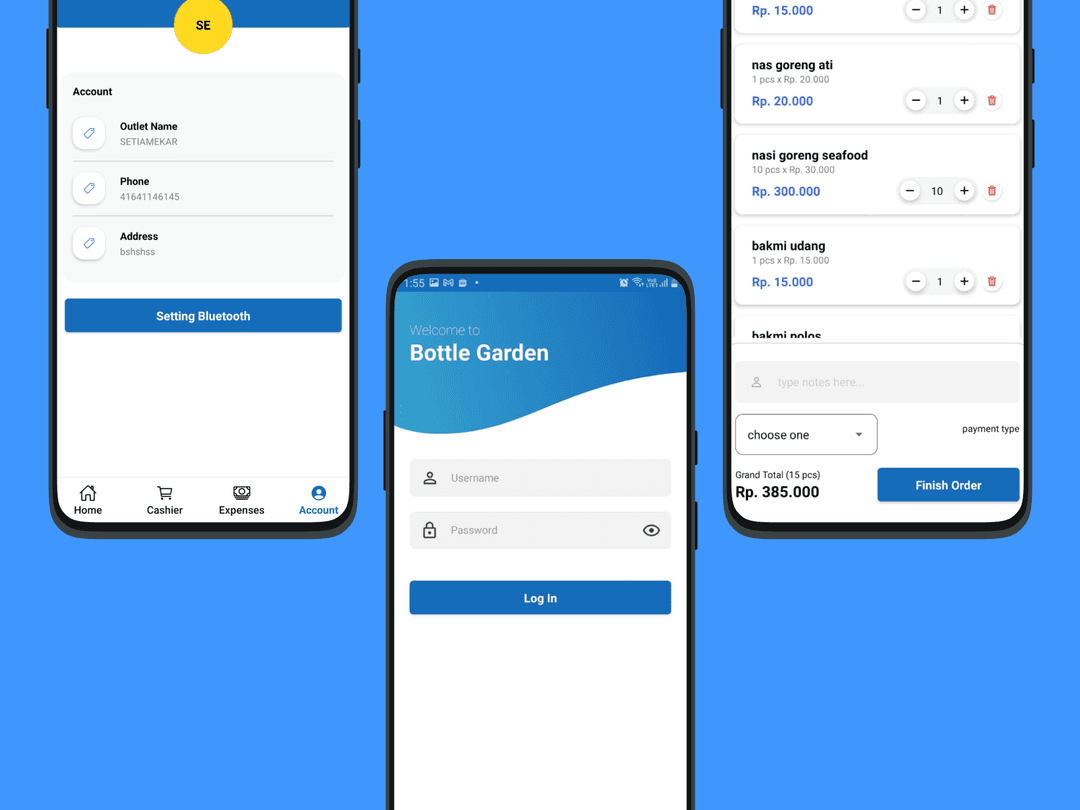
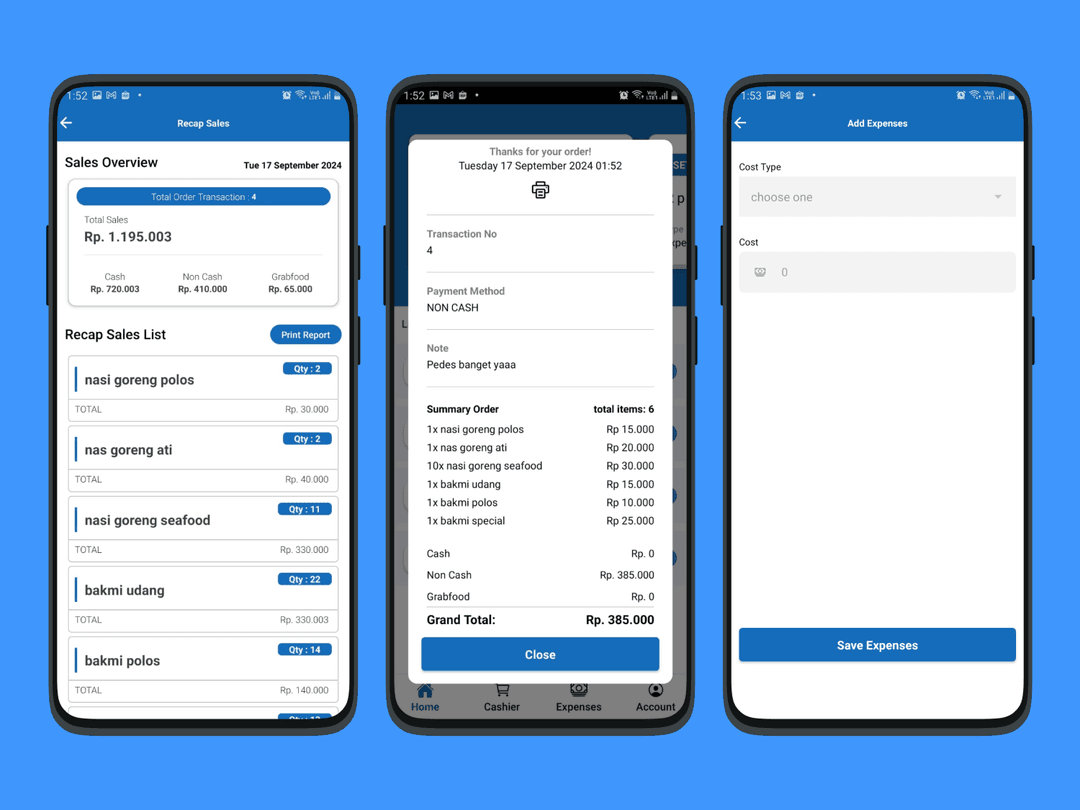
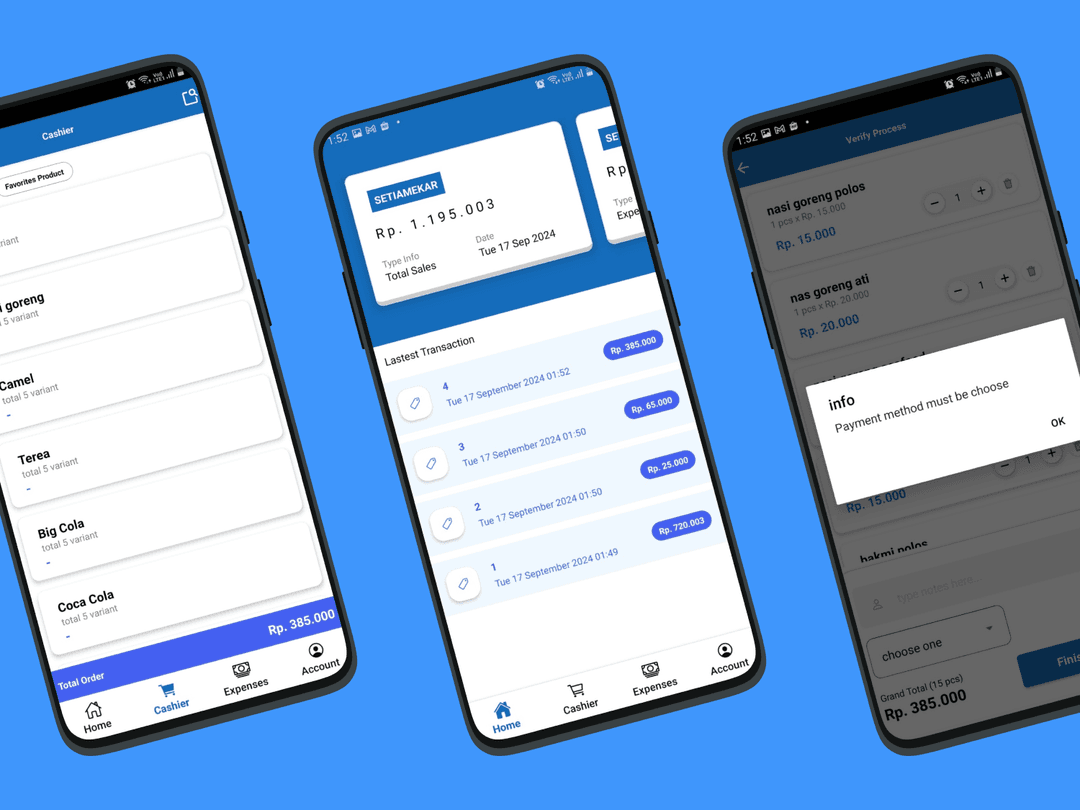
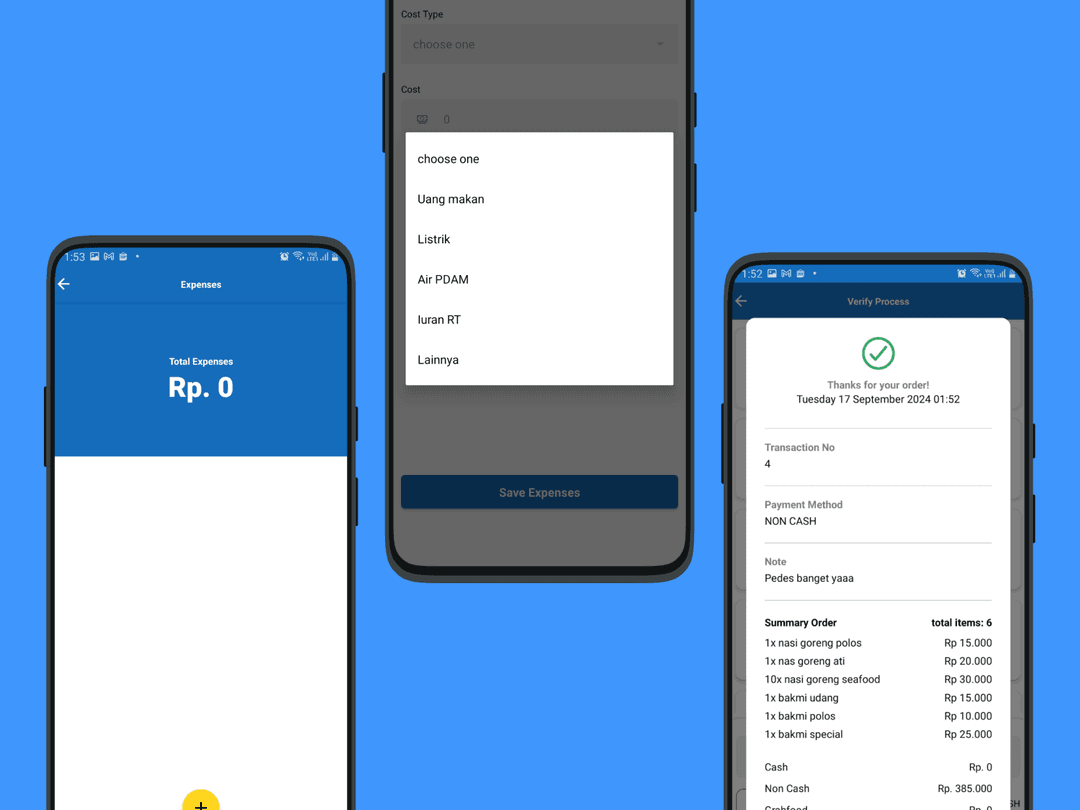
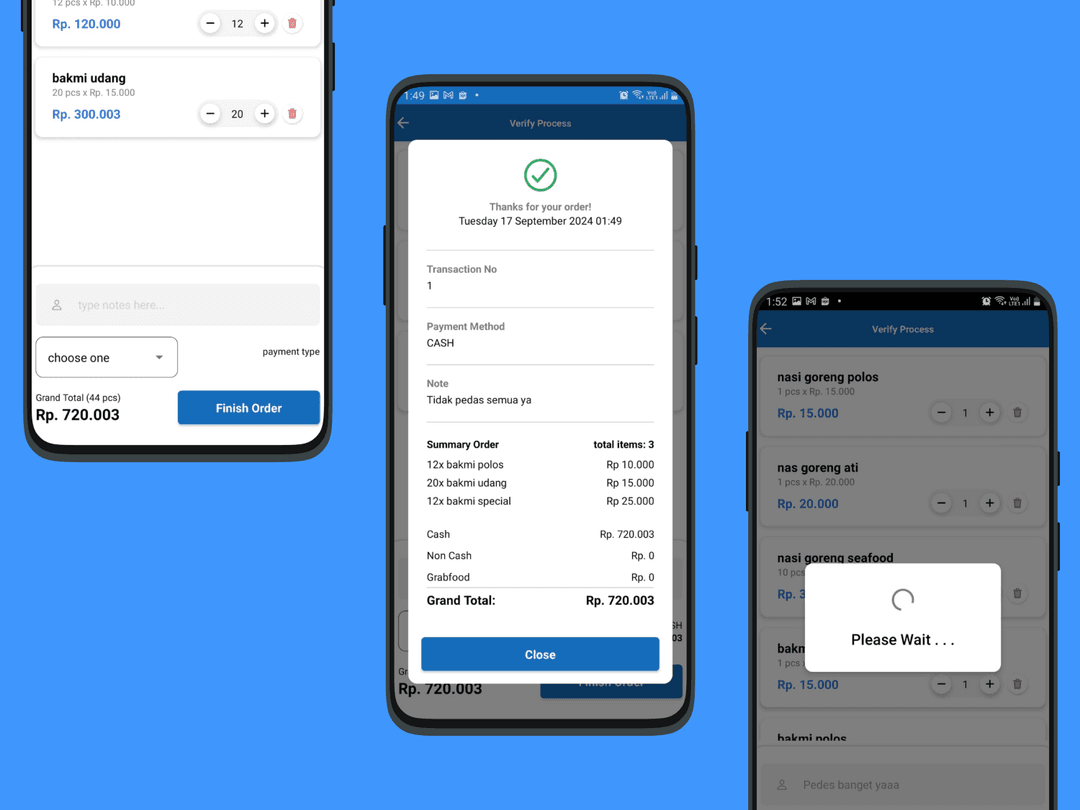
 mobile view mockup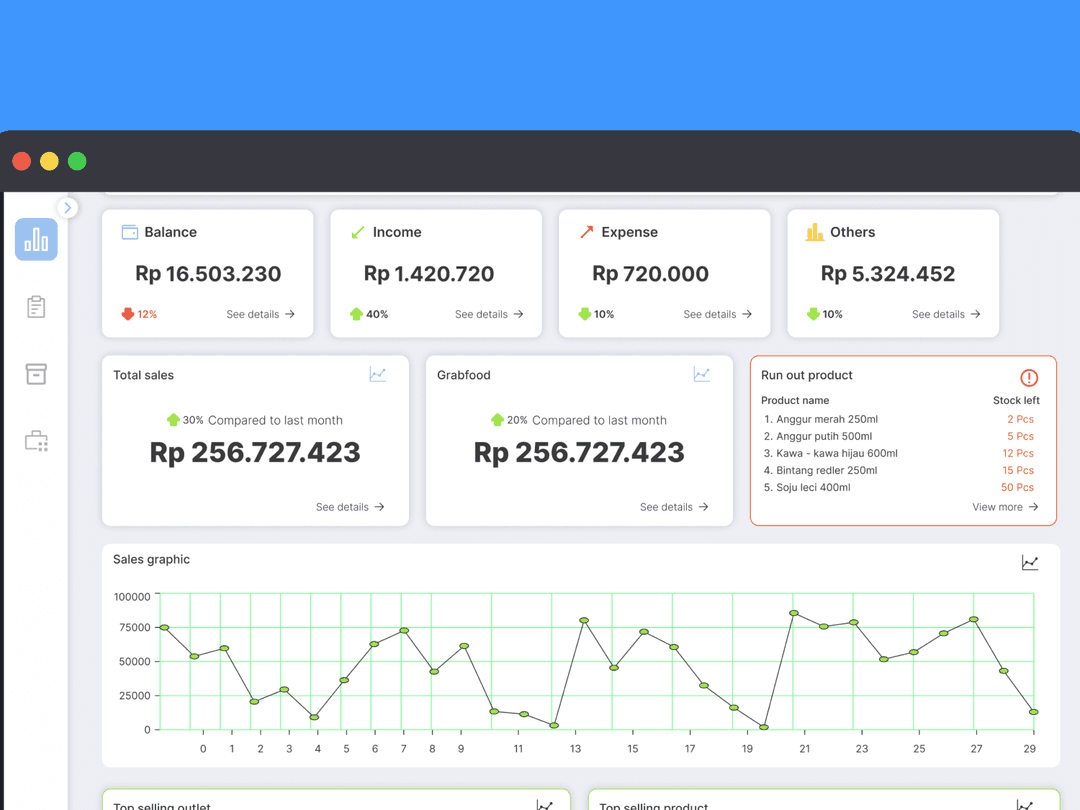
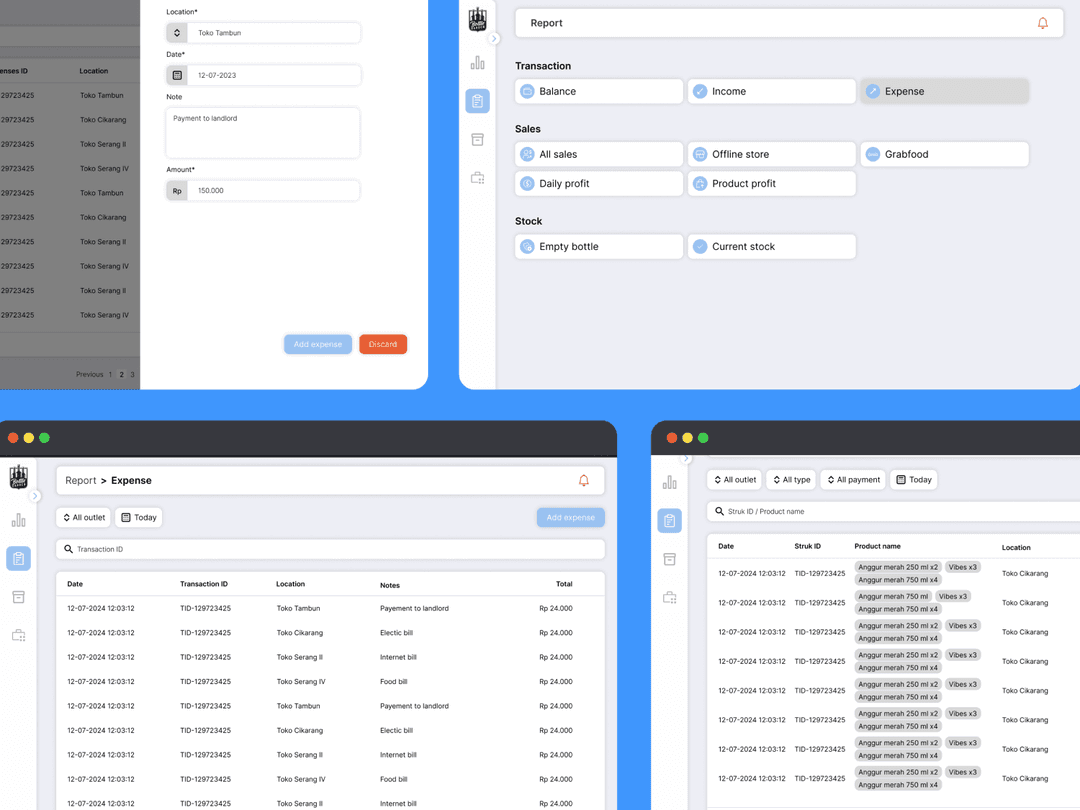
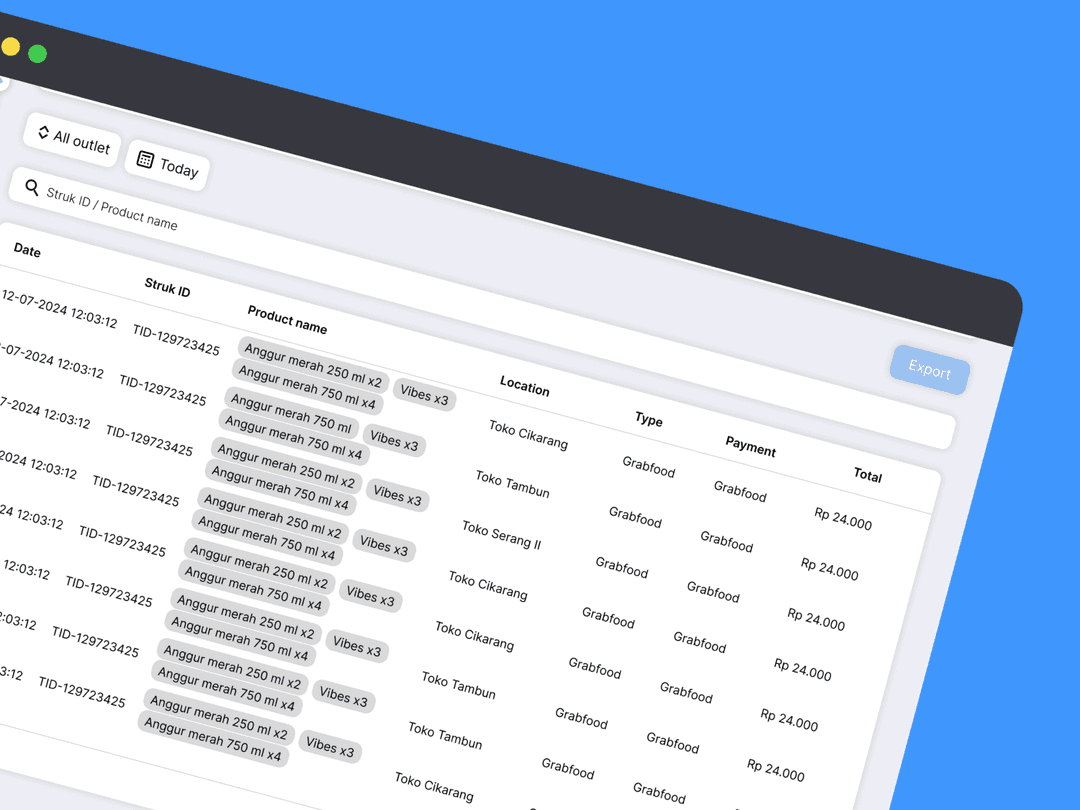
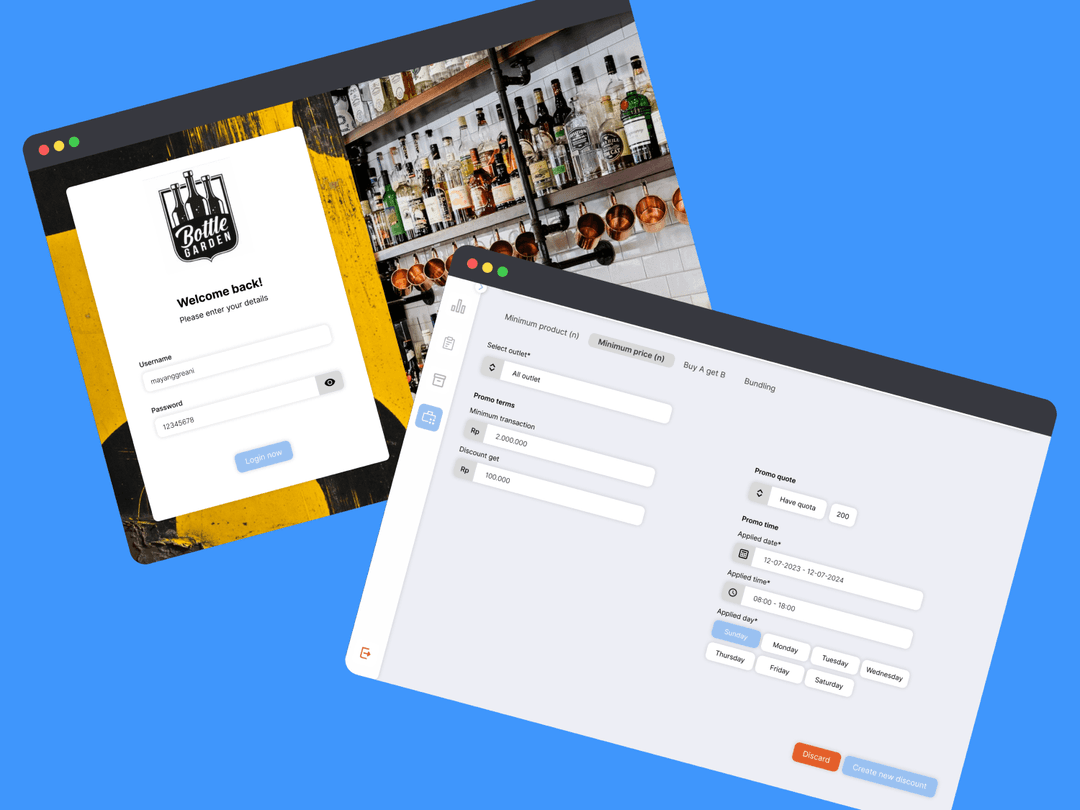
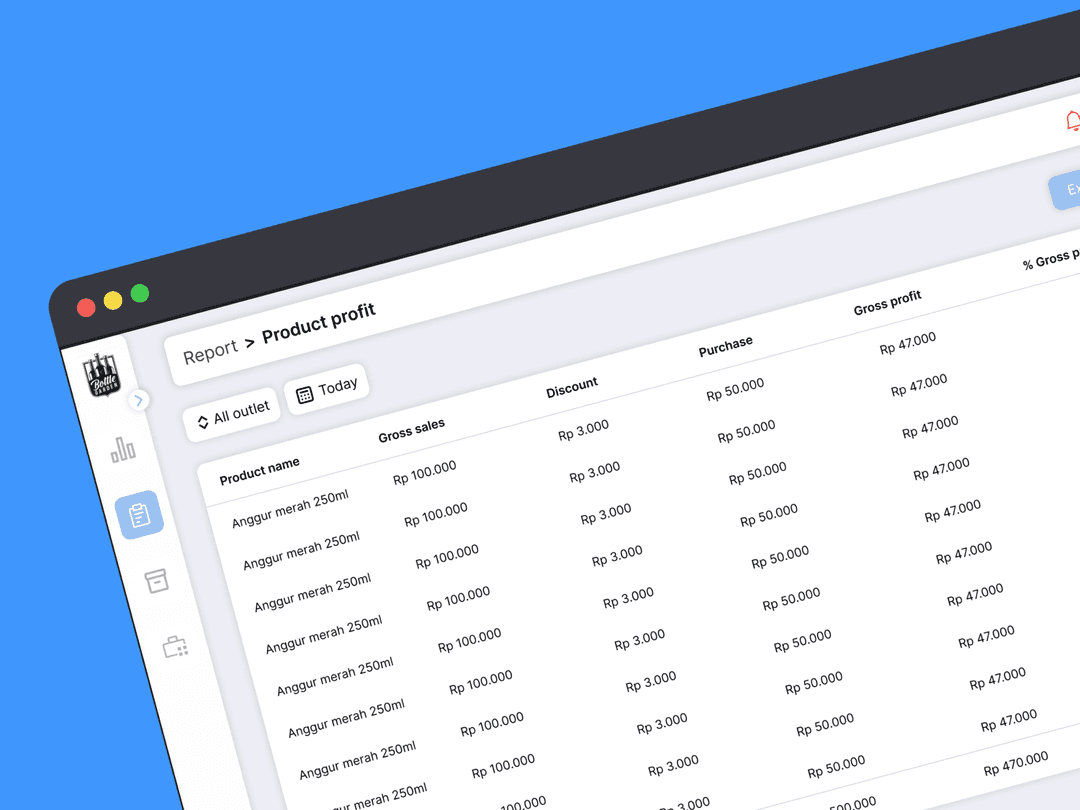
 Admin dashboard mockup
Developed user journey maps to outline key user interactions, from product selection to checkout for customers, and inventory management to sales reporting for admins.
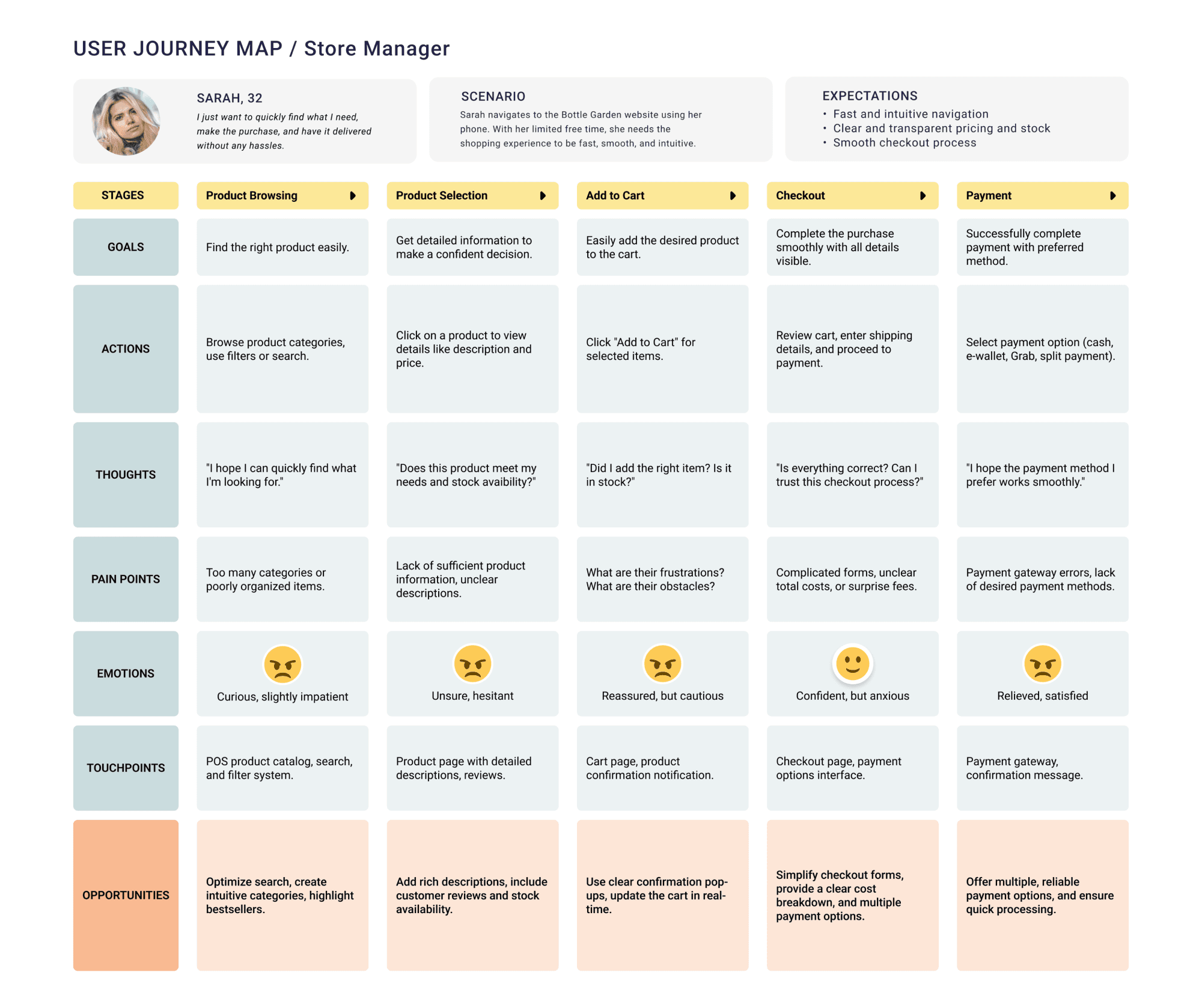
 Store manager and Admin user journey
Mockups focused on intuitive layouts, ensuring quick access to frequently used features for store staff and seamless product browsing for customers.
Iteration Round Source of Feedback Feedback Received Changes/Refinements Made Round 1: Initial Mockups Business owners and store managers The inventory dashboard was too complex; customer checkout flow was unclear. Simplified the inventory dashboard, clarified the customer checkout steps. Round 2: Journey Map Review Store employees and customers Navigation between product selection and checkout was too lengthy. Shortened the customer journey by consolidating steps and simplifying navigation. Round 3: Business Review Business owners Needed better data visualization for sales reports; clearer profit margins. Added improved data visualization and profit margin indicators on dashboards. Round 4: Usability Testing Employees and store managers Inventory management tools were hard to find; low-stock alerts needed more visibility. Enhanced inventory tool visibility and redesigned low-stock alerts on the dashboard. Round 5: Final Mockup Review Business owners and stakeholders Real-time updates for sales tracking were crucial for decision-making. Integrated real-time sales tracking and live data updates. Round 6: Post-Launch Adjustments Customers and store managers Customers wanted faster access to product categories; staff wanted easier access to sales reports. Improved navigation for product categories and added quick-access sales reports for staff.
Key Design Challenges
- Balancing simplicity with functionality: Admins needed powerful tools for inventory and sales tracking without overwhelming them with complex interfaces.
- Ensuring a consistent experience across web and Android platforms for both admin and client users.
- Optimizing the interface for various screen sizes, particularly for the mobile version used by store staff on the go.
- Handling feedback on specific POS features that were required to be efficient yet user-friendly.
Iterative Feedback Process
Collected feedback from store managers during design iterations, addressing issues like inventory view layout and sales reporting features.
Feedback Collected Issue Identified Design Iteration/Improvement Inventory View Layout Too cluttered, difficult to find products Redesigned the layout with clear categories, added a search bar for quick product lookup. Bulk Editing Stock Time-consuming to update stock manually Implemented a bulk editing feature, allowing managers to update multiple products at once. Low Stock Alerts Not visible enough on the dashboard Created prominent visual alerts (color-coded notifications) for low-stock products. Sales Reporting Features Reports lacked filter options Added filterable reports with options to sort by date, product category, and sales volume. Real-Time Sales Data Delays in updating sales information Integrated real-time sales data updates, ensuring reports reflect the latest transactions. User Access Controls for Store Managers Confusion over different user permissions Simplified user roles and access control to clarify permissions for store staff and managers. Checkout Process for Customers Multiple steps made checkout feel slow Streamlined the checkout process by reducing steps, making it faster and more intuitive. Product Detail Pages (Customer-Side) Lack of sufficient product information Enhanced product detail pages with more information (e.g., reviews, detailed descriptions). Ran usability tests with employees, incorporating their suggestions to improve navigation and streamline checkout flow
Usability Test Feedback Issue Identified Improvement Implemented Navigation Bar Employees found it difficult to quickly access key sections (e.g., inventory, sales reports). Reorganized the navigation bar with more intuitive labels and icons for faster access. Search Functionality Search bar was slow and did not display relevant results quickly. Optimized the search function for faster response and improved filtering capabilities. Product Categorization Products were difficult to browse, especially when looking for specific types. Improved product categorization with subcategories and filters for easier navigation. Checkout Flow Checkout had too many steps, slowing down the process. Streamlined the checkout process by reducing unnecessary steps and simplifying the payment options. Cart Review Employees requested a clearer cart review before confirming checkout. Added a "Review Order" page before the final checkout for customers to review items easily. Inventory Management Navigation The path to access inventory management was buried under several clicks. Created a quick access button on the dashboard for faster entry into inventory management. Sales Report Export Employees found it hard to export sales data for analysis. Added a one-click export button for sales data, supporting multiple file formats (CSV, PDF). Payment Methods Confusion with non-cash payment options (e.g., Grab, split payment). Enhanced the UI for selecting payment methods, making it clearer and easier to choose. Continuous collaboration with stakeholders through design sprints, refining key features based on business needs and user feedback
Sprint Phase Stakeholder Involvement Feature/Feedback Refinement/Outcome Sprint 1: Initial Concept Business owners and store managers POS system concept: Initial inventory, sales reporting. Defined key business needs (inventory management, sales tracking) based on stakeholder input. Sprint 2: Prototype Review Store staff and customers (user testing) Inventory layout cluttered, sales reporting not customizable. Simplified inventory layout, added customization options to sales reporting features. Sprint 3: Usability Testing Store managers and business owners Checkout process had too many steps, slowing transactions. Streamlined checkout flow, reducing unnecessary steps for a faster transaction process. Sprint 4: Feature Prioritization Stakeholders involved in prioritizing business-critical features. Real-time sales data, bulk stock updates requested. Integrated real-time data updates and implemented bulk stock editing for easier management. Sprint 5: Final Feedback Loop Business owners, store managers, and employees Feedback on final features (payment integration, low-stock alerts). Improved payment integration for smooth processing, added low-stock alerts to dashboard. Sprint 6: Post-Launch Review All stakeholders (store managers, employees, customers) Post-launch feedback: Real-time tracking, user access controls. Added real-time tracking for managers and clearer user access controls for staff. Iterated on mockups and journey maps after each round of feedback to ensure the design aligned with both business objectives and user expectations.
Iteration Round Source of Feedback Feedback Received Changes/Refinements Made Round 1: Initial Mockups Business owners and store managers The inventory dashboard was too complex; customer checkout flow was unclear. Simplified the inventory dashboard, clarified the customer checkout steps. Round 2: Journey Map Review Store employees and customers Navigation between product selection and checkout was too lengthy. Shortened the customer journey by consolidating steps and simplifying navigation. Round 3: Business Review Business owners Needed better data visualization for sales reports; clearer profit margins. Added improved data visualization and profit margin indicators on dashboards. Round 4: Usability Testing Employees and store managers Inventory management tools were hard to find; low-stock alerts needed more visibility. Enhanced inventory tool visibility and redesigned low-stock alerts on the dashboard. Round 5: Final Mockup Review Business owners and stakeholders Real-time updates for sales tracking were crucial for decision-making. Integrated real-time sales tracking and live data updates. Round 6: Post-Launch Adjustments Customers and store managers Customers wanted faster access to product categories; staff wanted easier access to sales reports. Improved navigation for product categories and added quick-access sales reports for staff.
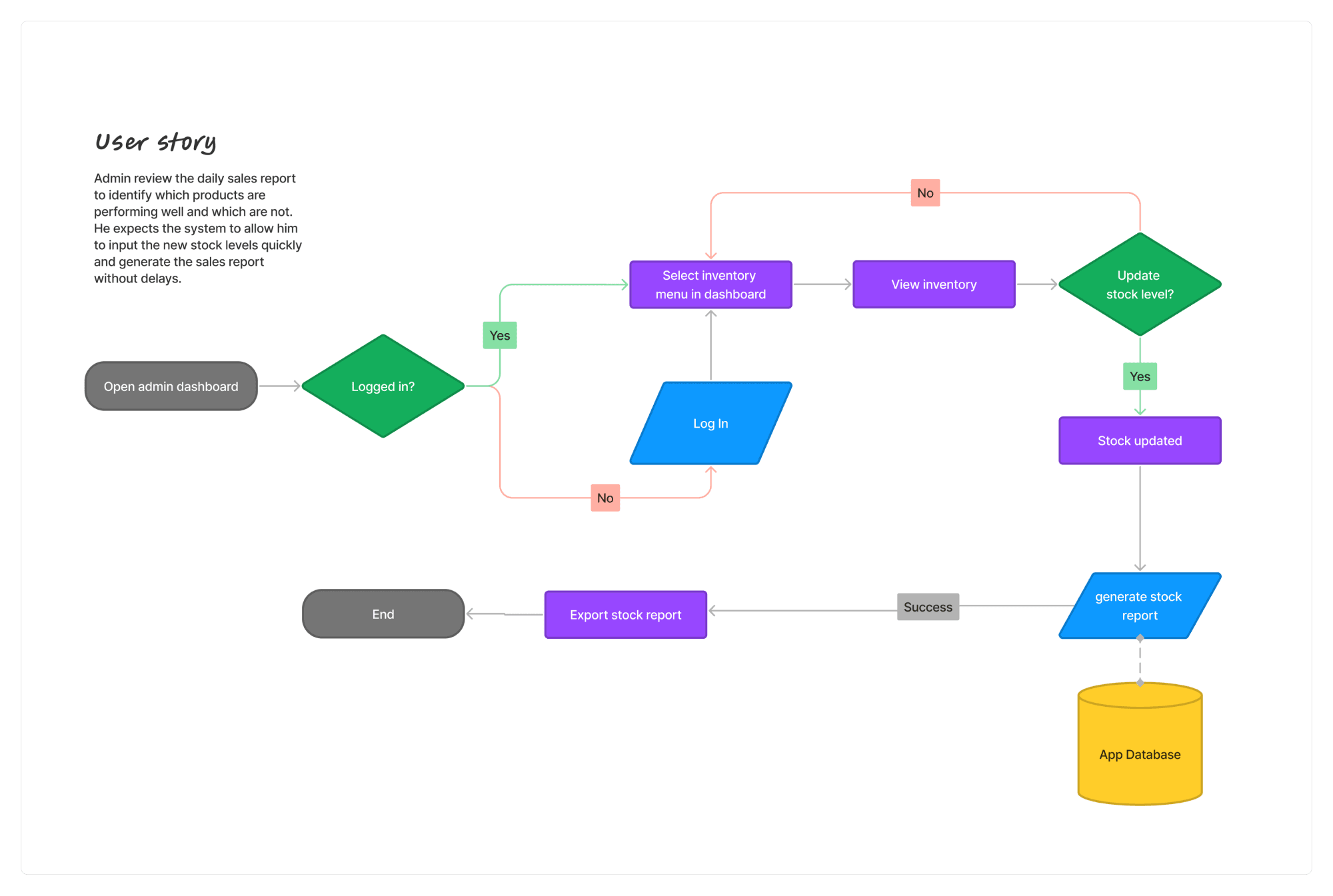
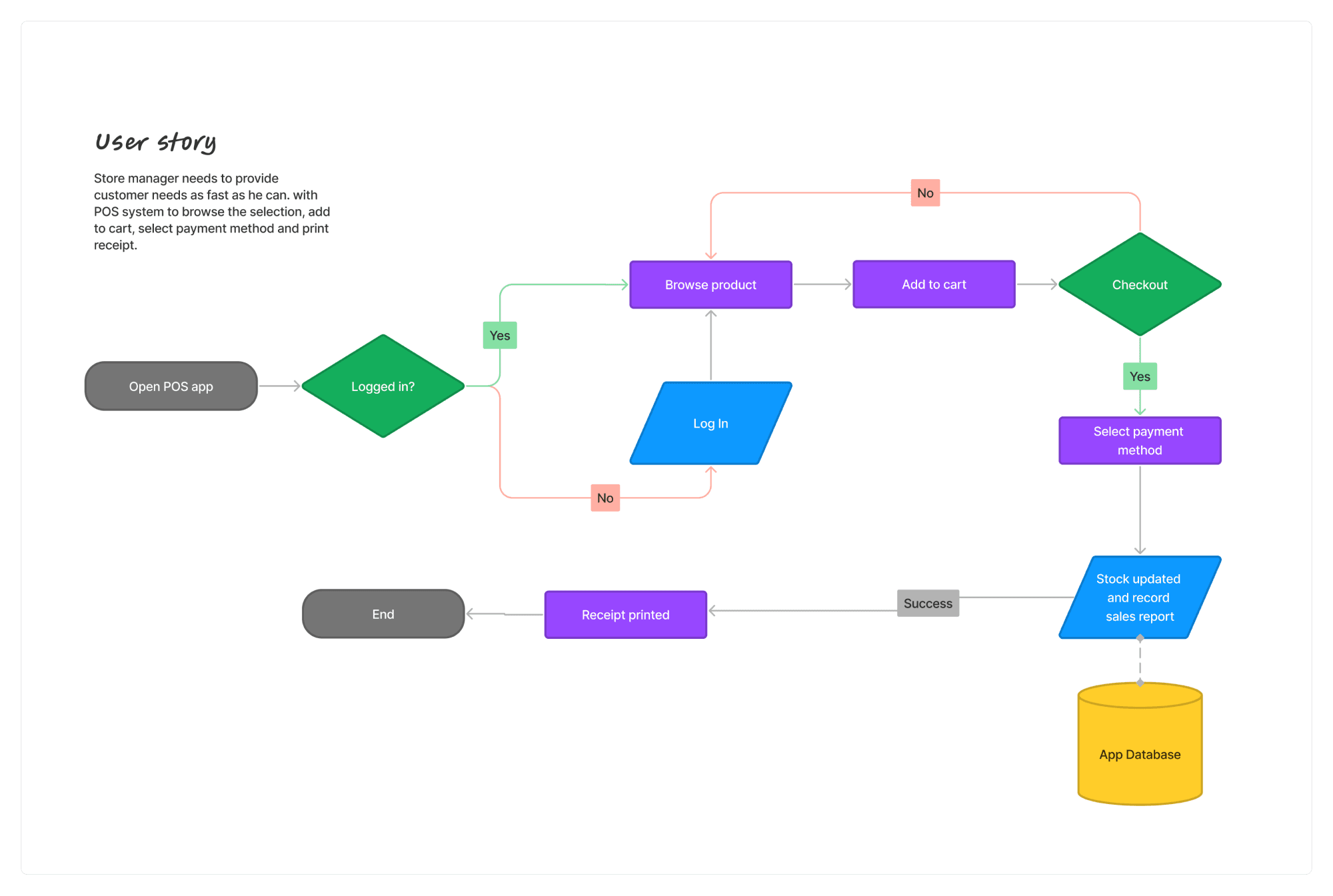
User Experience Flow
The user experience flow for Bottle Garden’s POS system was designed to minimize friction in both admin and client interactions. Admins can manage sales and inventory in a few clicks, while customers enjoy a quick and intuitive checkout process.
Project Management
I managed the project using Agile methodologies, breaking down the work into sprints and managing priorities via a Kanban board. This allowed for clear communication across teams and ensured that deadlines were met efficiently.
Project Milestones
Milestone Status Description Completion Date Phase 1: Research & Discovery Completed Conducted stakeholder interviews and gathered business requirements, Defined user personas and key system needs. Week 1 Phase 2: Wireframing & Mockups Completed Created low-fidelity wireframes and iterated based on initial feedback, Developed high-fidelity mockups for POS. Week 3 Phase 3: Development Sprint 1 Completed Backend setup for inventory management, UI implementation for admin interface (login, dashboard). Week 5 Phase 4: Development Sprint 2 Completed Frontend development for customer checkout interface, Integration of payment methods (cash, card, digital) Week 6 Phase 5: Testing & QA Completed Manual testing of inventory and sales tracking features, Automation testing scripts using Cypress. Week 7 Phase 6: User Feedback & Iterations Completed Gather user feedback from store managers and staff, Refine the user interface based on feedback. Week 8 Phase 7: Final Launch Completed Deployment of POS system across all stores, Post-launch support and monitoring. Week 10 Sprint Planning and Execution Highlights
Sprint Sprint Goal Key Tasks Execution Highlights Sprint 1 Build core inventory management features. Set up product categories, Implement stock level tracking, Connect database to the backend. Successfully delivered product and inventory database integration, Blocker: API issue delayed stock tracking. Sprint 2 Develop customer-facing checkout and payment options. UI design for checkout flow, Integrate payment gateway for card payments, Design receipt interface. UI design completed and approved, Payment gateway integration delayed due to third-party issues Sprint 3 Testing and QA of admin features. Manual testing of stock level updates, Automation test cases for sales tracking, Fix identified bugs Manual testing identified critical bugs in stock levels, Cypress scripts ran successfully. Sprint 4 Gather user feedback and iterate on design. Organize user testing sessions with store managers, Gather feedback and refine user interface. Feedback helped improve navigation, Refined analytics dashboard based on user insights. Sprint 5 Final testing and deployment. Conduct final system-wide testing, Deploy POS system to all stores. Final tests passed smoothly, Successfully deployed the POS system to all locations.
Testing & Quality Assurance
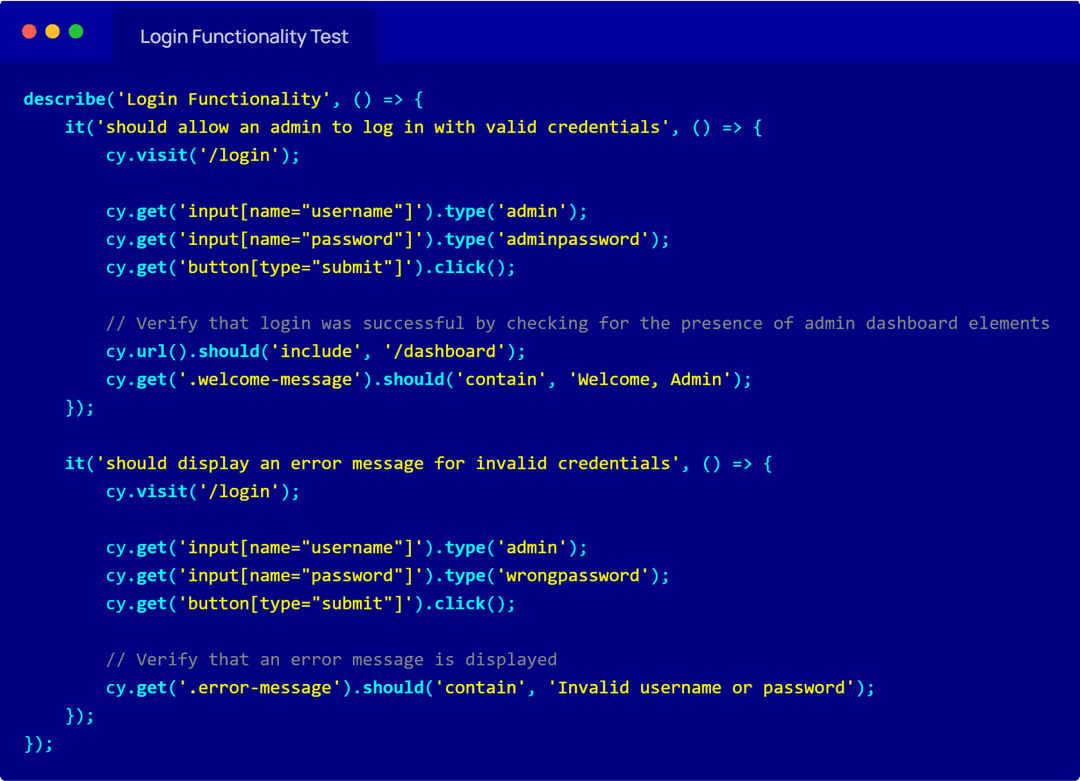
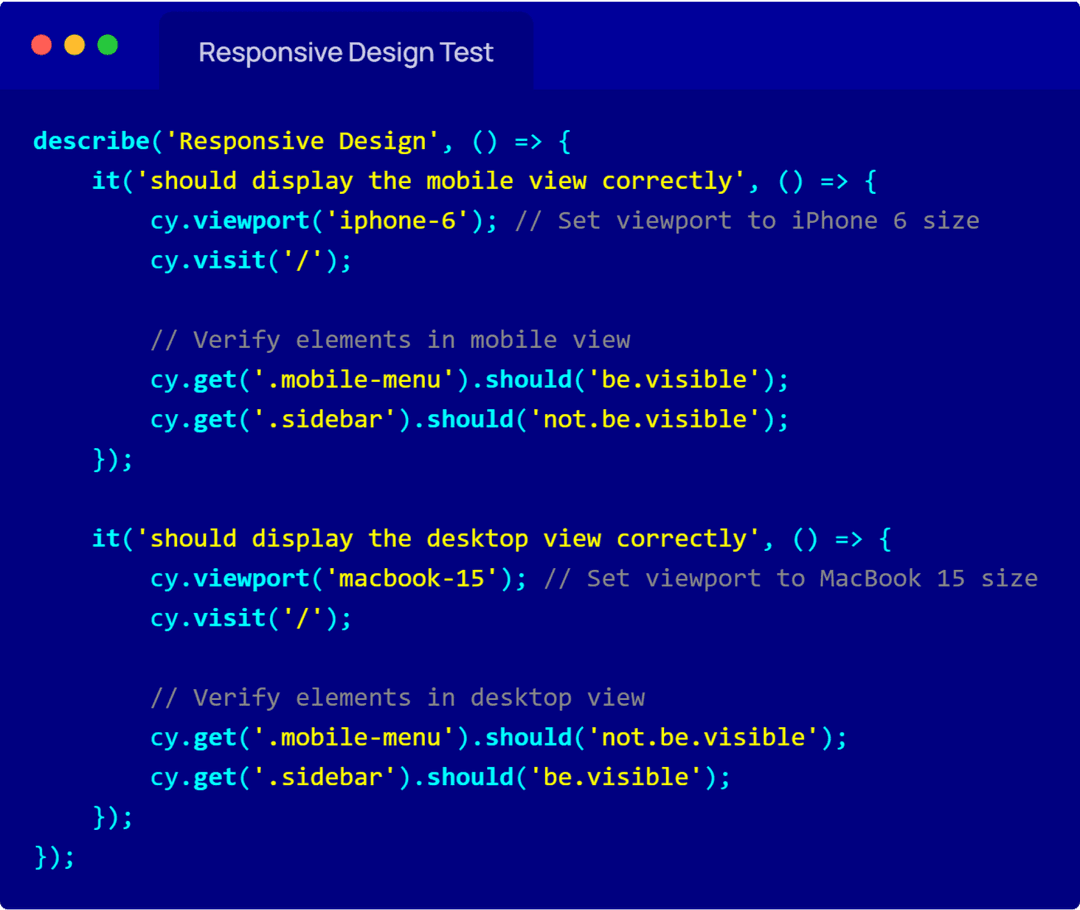
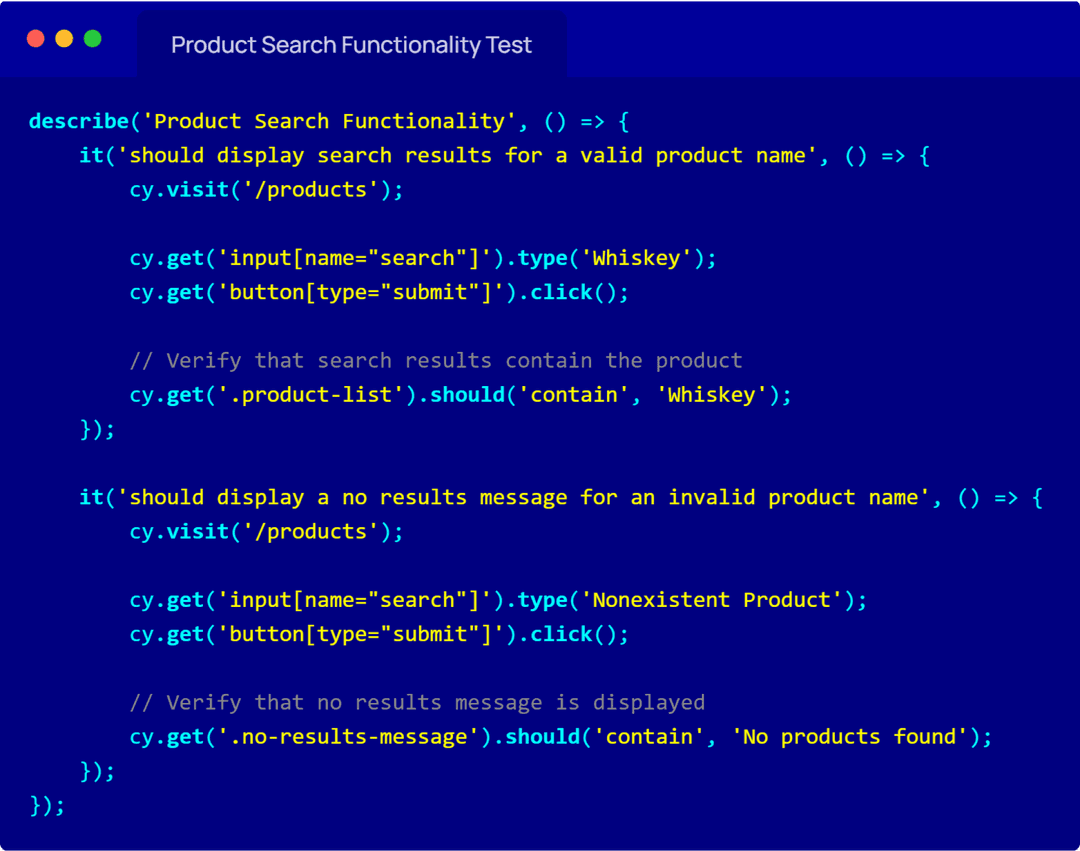
Manual testing and automation testing were critical to ensure the POS system’s stability. I created test cases for key functionalities and implemented automation using Cypress, which allowed for continuous testing throughout the development cycle.
| field | Details |
|---|---|
| Test Case ID | TC_001 |
| Test Case Name | Verify Inventory Management - Stock Update |
| Objective | Ensure that stock levels are updated correctly when inventory is added or removed. |
| Preconditions | User is logged in as an admin, Inventory management system is accessible. |
| Test Steps | 1. Navigate to the Inventory Management section. 2. Select a product to update. 3. Adjust the stock level. 4. Save changes. 5. Verify the updated stock level. |
| Expected Result | The stock level for the selected product should be updated in the system and displayed accurately. |
| Actual Result | The stock level for the selected product not updated properly |
| Status | Fail |
| Comment | The stock update should return error messages if fields are left blank or if invalid data is entered |
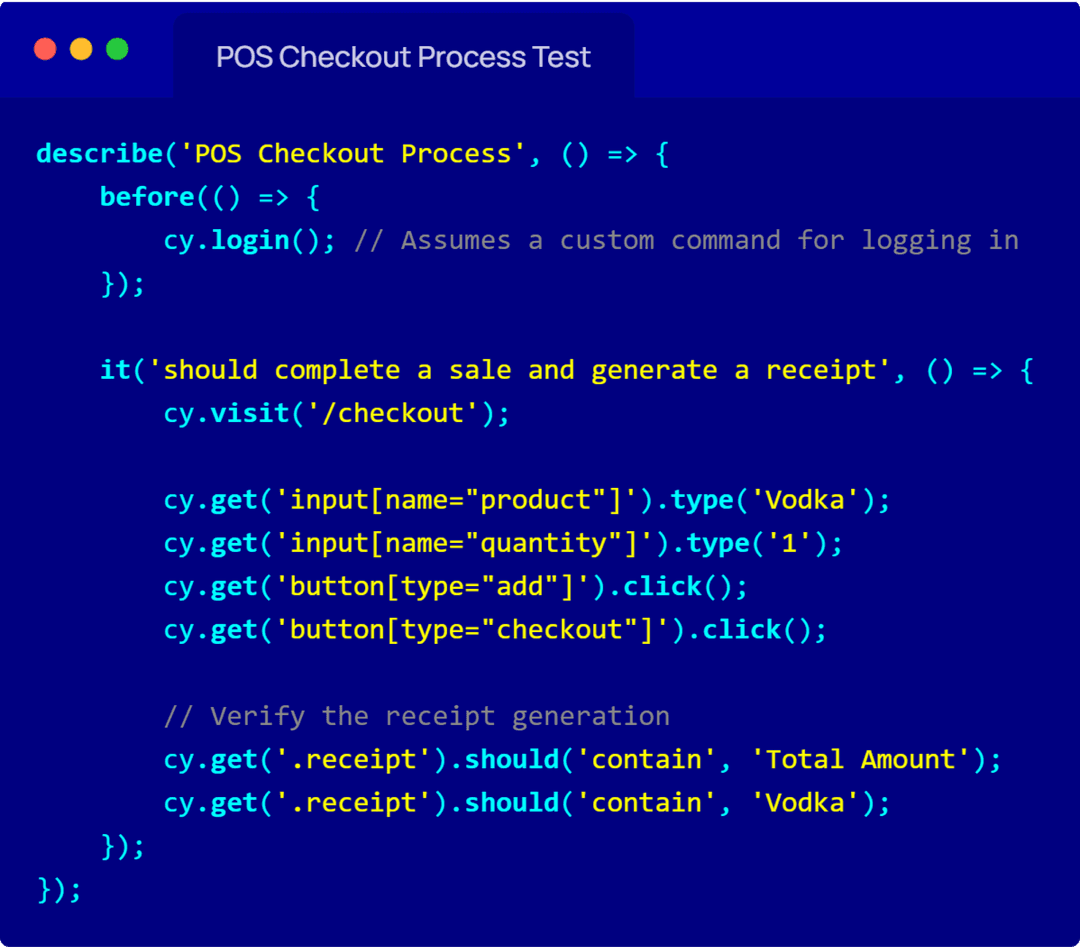
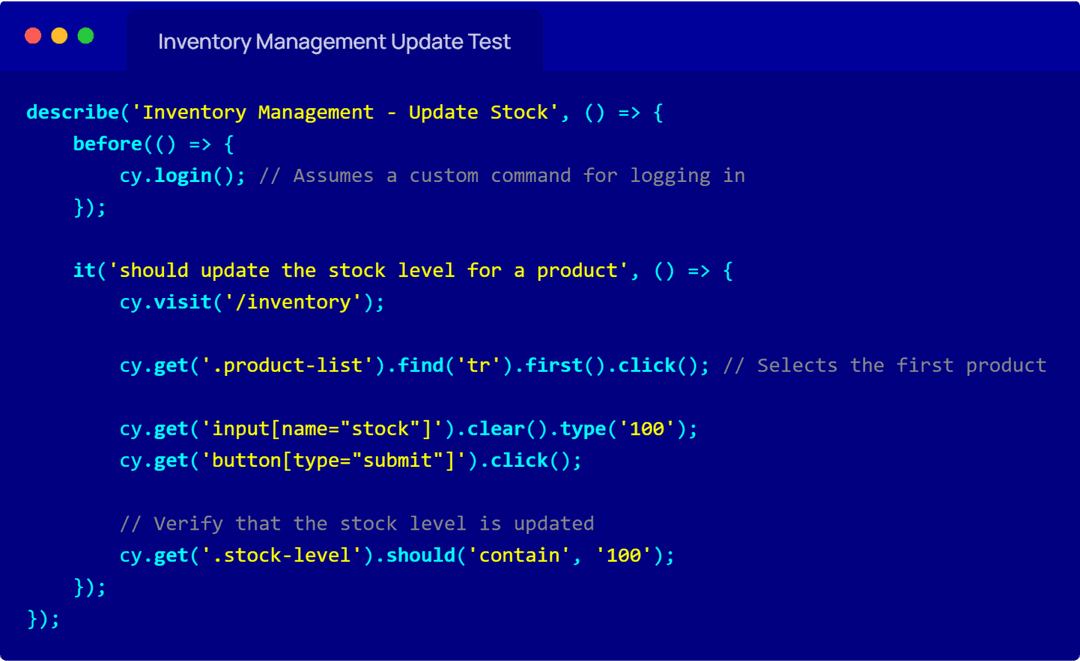
Results & Impact
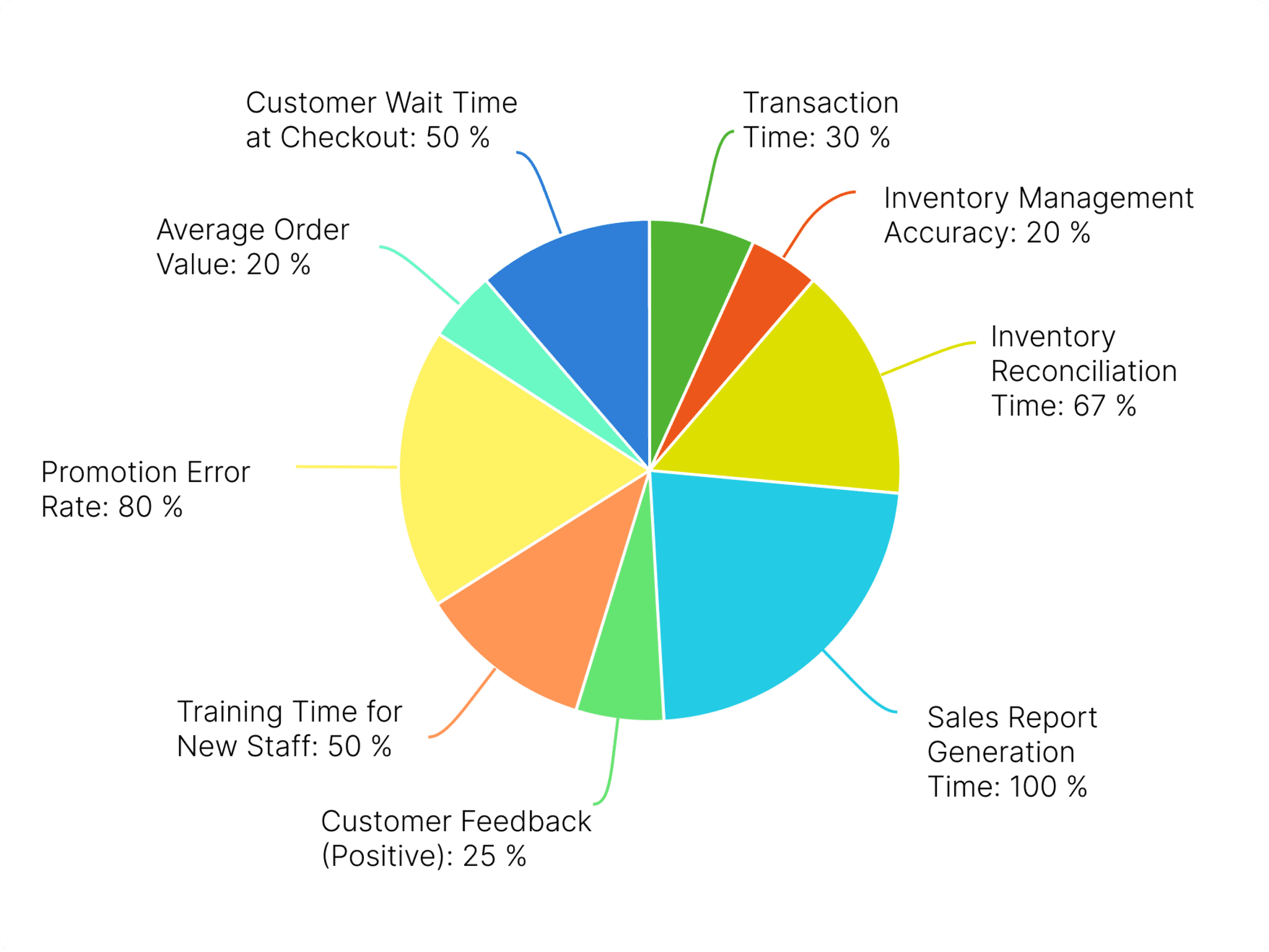
The POS system led to a 30% reduction in transaction times, a 20% improvement in inventory management accuracy, and significantly improved the customer experience, as reflected in a 25% increase in positive customer feedback post-launch.
key metrics to compare the Pre-POS Implementation and Post-POS Implementation phases
Key Metric Pre-POS Implementation Post-POS Implementation Improvement Transaction Time Avg. 5 minutes per transaction (manual input, cash registers, paper receipts) Avg. 3.5 minutes per transaction (automated checkout, card & mobile payments) 30% Reduction in transaction times due to faster processing and reduced manual entry. Inventory Management Accuracy 80% (manual stock counting, errors in inventory data entry) 96% (automated stock tracking, real-time inventory updates) 20% Improvement in accuracy, reducing stock discrepancies and out-of-stock scenarios. Inventory Management Efficiency Monthly manual audits, stock reports delayed Daily/real-time automated inventory updates, audit trails Faster and more frequent updates, ensuring accurate stock levels and quicker restocking. Sales Reporting Weekly manual sales reports, delayed insights into bestsellers and trends Real-time sales reporting, live tracking of bestsellers, and trends Immediate insights into sales performance, helping staff adjust product offerings and promotions faster. Payment Methods Cash and limited card options, no mobile payments Multiple payment methods (cash, card, mobile payments, digital wallets) More payment flexibility for customers, leading to smoother transactions and fewer abandoned purchases. Customer Feedback (Positive Feedback) 60% positive feedback (slow checkout, inventory inaccuracies) 85% positive feedback (faster transactions, smoother checkout experience) 25% Increase in positive feedback due to improved overall shopping experience and reduced wait times. Customer Experience Customers faced frequent product availability issues, limited payment methods, and slow checkouts Enhanced customer experience with faster checkout, accurate inventory, and various payment methods Significantly improved customer experience leading to repeat business and brand loyalty. Training Time for New Staff 2 weeks (manual systems, complex workflows) 1 week (intuitive UI/UX, simplified workflows) 50% Reduction in training time, allowing staff to become productive more quickly. Product Promotions & Discounts Manual application of discounts, prone to human error Automated promotions and discount management in the POS system Reduced errors, better promotion tracking, and increased customer engagement with deals. Product Listings Management Product information updates took days to reflect in stores Real-time updates to product listings, with immediate reflection in stores Instant updates on new products or price changes, improving product visibility and availability. Impact on user selling products
User Impact Before POS Implementation After POS Implementation Key Improvement Transaction Volume Limited by slow processing Higher volume with faster checkout More customers served, leading to more sales. Inventory Control Prone to stockouts or overstocking Precise stock control, real-time adjustments Prevented lost sales due to stockouts and overstocking issues. Staff Productivity Manual processes slowed down operations Automated processes, quicker tasks Staff could handle more tasks with less effort, improving output. Customer Service Long wait times, slow issue resolution Quick checkouts, easier problem resolution Smoother experience led to more satisfied customers. Bottle garden POS improvement metrics
Reflection & Lessons Learned
This project taught me the importance of aligning user needs with business objectives and how a user-centered design can significantly improve operational efficiency. I also gained valuable experience in balancing design and technical constraints while managing cross-functional teams.
the key lessons learned from the project, the challenges faced, and what could be done differently
| Category | Details |
|---|---|
| 1. Importance of Clear Requirements | Ensuring that requirements are well-defined from the start helps in avoiding scope creep and project delays. Clear requirements prevent misunderstandings and misaligned expectations. |
| 2. Effective Communication | Regular communication with stakeholders is crucial for understanding their needs and expectations. Frequent updates and feedback loops help in aligning the project's direction. |
| 3. Value of Automated Testing | Automated tests, like those written in Cypress, significantly speed up the testing process and reduce human error. They help in ensuring that changes do not break existing functionalities. |
| 4. User-Centric Design Approach | Designing with the end user in mind improves user satisfaction and system usability. Regular user feedback helps in refining the user experience. |
| 5. Importance of Responsive Design | Ensuring that the system works well on various devices and screen sizes is crucial for user accessibility and engagement. Responsive design is a key aspect of modern UI/UX. |
| Challenges overcome | Details |
|---|---|
| 1. Handling Complex Inventory Management | Integrating complex inventory management features into the POS system required extensive planning and testing. Overcoming this challenge involved detailed requirement gathering and iterative design. |
| 2. Ensuring Data Accuracy | Maintaining accurate data in real-time, especially during high-traffic periods, was challenging. Implementing robust validation and error-handling mechanisms helped in addressing this issue. |
| 3. Achieving Cross-Platform Compatibility | Ensuring that the system functioned smoothly across various devices and browsers required thorough testing and adjustments. Using responsive design principles and cross-browser testing tools was key. |
| 4. Managing Stakeholder Expectations | Balancing different stakeholder needs and expectations required clear communication and regular updates. Setting realistic timelines and delivering incremental progress helped manage expectations. |
| Room for improvement | Details |
|---|---|
| 1. More Detailed Initial Planning | Spending additional time on initial planning and requirement analysis would help in identifying potential issues early and setting clearer project goals. |
| 2. Enhanced User Testing | Conducting more extensive user testing phases earlier in the project would provide better insights into user needs and preferences, allowing for more refined design adjustments. |
| 3. Incremental Delivery Approach | Adopting a more incremental delivery approach with frequent releases and feedback loops would facilitate early detection of issues and allow for quicker iterations based on user feedback. |
| 4. Improved Documentation | Providing more detailed documentation throughout the project would improve knowledge transfer and help future maintenance and enhancements. |
Final Thoughts
By leading the POS system design for Bottle Garden, I delivered a solution that not only enhanced customer satisfaction but also streamlined internal operations. This project showcases my ability to manage end-to-end product development and create impactful, user-focused designs.